The Context
A few weeks ago, while running User Acceptance Testing (UAT) with a client, we hit a simple snag that was causing a disproportionate amount of friction. The client used HTML templates hosted on an Amazon S3 bucket. Every time the user requested a copy change or a layout tweak, the team hit a wall regarding speed and automation.
The workflow was painful: download a specific template, edit it and re-upload it via the AWS Console. Doing this file by file made the process slow, tedious and highly prone to human error.
The Problem
Our first reaction was the standard one: look for a native tool in the AWS Console or an official CLI command. We were genuinely surprised to discover that while S3 allows for bulk uploads, there is no native “Download Folder” feature in the AWS console.
We swallowed that pill and moved to option two: finding a third-party tool to fetch all files—in this case, templates—in one go. The surprise was even bigger here. We couldn’t find a reliable tool or even a half-baked Proof of Concept (PoC). It seemed like no one had tackled this specific friction point before. Worse, forum discussions on GitHub and Reddit boiled down to: “That doesn’t exist. You have to download one file at a time.”
We found it hard to believe, but after exhausting our search, we arrived at the part we enjoy the most: Do it yourself.
The Solution
Important Disclaimer: This is neither an official AWS tool nor a production-ready enterprise product. It is a Proof of Concept (PoC) built for a specific client need. If you find this code useful and decide to use it, you do so entirely at your own risk. The authors decline any responsibility for its use.
We decided to solve this manually yet automatically (the paradox of automation). We built a Rust API that downloads a ZIP file containing all templates based on an S3 Bucket name and an S3 Path (supporting sub-folders).
Once we had the ZIP, we applied a shell script to update the HTML files in bulk locally. Finally, we used the AWS Console’s native bulk upload feature to push the changes back. It sounds obvious, but when you have to modify 50 templates per folder this small tool makes the process feel truly automated.
Before we dive in, the full source code is available on GitHub: 👉 https://github.com/gabo-gil-playground/rust-aws-s3-downloader
We started with a basic API skeleton we use for bootstrapping Rust applications, based on axum and tokio. We then added the logic to create an S3 client to consume bucket elements using aws-config and aws-sdk-s3. Finally, we compressed the stream using the zip crate.
Here are the core dependencies in Cargo.toml:
[dependencies]
axum = {version = "=0.8.7", features = ["http2", "ws", "multipart"]}

aws-config = { version = "=1.8.12", default-features = false }
aws-sdk-s3 = { version = "=1.118.0", default-features = false, features = ["rt-tokio", "rustls"] }

tokio-util = { version = "=0.7.17" }
zip = { version = "=6.0.0" }
Pro-tip #1: Environment-aware Configuration
Create the S3 client using load_from_env. This ensures the application respects the environment configuration, whether it’s running locally or in a container.
// src/config/aws_sdk_s3_client.rs

async fn create_aws_sdk_client(&self) -> Client {
        let aws_sdk_configuration = aws_config::load_defaults(BehaviorVersion::latest()).await;
        Client::new(&aws_sdk_configuration)
    }
Pro-tip #2: Seamless Authentication
Set your AWS environment variables. You can achieve this via the AWS CLI (aws login) which populates your credentials file, or by explicitly exporting variables in your terminal before running the app:
export AWS_REGION=us-east-1
export AWS_ACCESS_KEY_ID=your_key
export AWS_SECRET_ACCESS_KEY=your_secret
# export AWS_SESSION_TOKEN=optional_token
Pro-tip #3: Modularize S3 Interactions
Since the AWS API does not support “bulk download” operations, iteration is inevitable. We modularized access to list objects and then fetch their content to keep the logic clean and reusable.
// src/service/aws_sdk_s3_service.rs

#[async_trait]
pub trait AwsSdkS3ServiceTrait {
    /// Adds S3 object by [String] bucket name, [String] path, [String] s3 key and [Bytes] content
    /// Returns a [String] with added S3 file key value
    /// Returns a [CommonError] if result is empty or S3 throws any error
    async fn add_s3_object(
        &self,
        bucket_name: String,
        path: String,
        s3_key: String,
        s3_key_content: &Bytes,
    ) -> Result<String, CommonError>;

    /// Gets [(String, Vec<u8>)] S3 key value and stream content by [String] bucket name,
    /// [String] path and [String] s3 key
    /// Returns a [CommonError] if result is empty or S3 throws any error
    async fn get_s3_object(
        &self,
        bucket_name: String,
        path: String,
        s3_key: String,
    ) -> Result<(String, Vec<u8>), CommonError>;

    /// Gets [Vec<String>] S3 key list by [String] bucket name and [String] path
    /// Returns a [CommonError] if result is empty or S3 throws any error
    async fn get_s3_object_key_list(
        &self,
        bucket_name: String,
        path: String,
    ) -> Result<Vec<String>, CommonError>;

    /// Gets [(String, Vec<u8>)] S3 objects keys and contents by [String] bucket name and [String] path
    /// Returns a [CommonError] if result is empty or S3 throws any error
    async fn get_s3_objects_by_path(
        &self,
        bucket_name: String,
        path: String,
    ) -> Result<Vec<(String, Vec<u8>)>, CommonError>;

    /// Gets [(Vec<(String, Vec<u8>)>, Vec<String>)] S3 objects keys and contents + not found keys
    /// by [String] bucket name, [String] path and [Vec<String>] S3 key list
    /// Returns a [CommonError] if result is empty or S3 throws any error
    #[allow(clippy::type_complexity)] // avoid define the result as a type (suggested by clippy)
    async fn get_s3_objects_by_keys(
        &self,
        bucket_name: String,
        path: String,
        s3_keys: Vec<String>,
    ) -> Result<(Vec<(String, Vec<u8>)>, Vec<String>), CommonError>;
}
Pro-tip #4: Safety Limits
To avoid saturating memory or hitting network timeouts, we defined limits for file sizes and the number of files per request. Rust is memory-efficient but valid safeguards prevent Out of Memory errors on large buckets.
// src/constant/constants.rs
pub const AWS_S3_MAX_FILE_QUANTITY_ENV_VAR: &str = "AWS_S3_MAX_FILE_QUANTITY";
pub const AWS_S3_MAX_FILE_QUANTITY_DEFAULT: &str = "100";

pub const AWS_S3_MAX_FILE_SIZE_BYTES_ENV_VAR: &str = "AWS_S3_MAX_FILE_SIZE_BYTES";
pub const AWS_S3_MAX_FILE_SIZE_BYTES_DEFAULT: &str = "2097152"; // ((bytes * 1024 = KB) * 1024 = MB)

// src/service/aws_sdk_s3_service.rs
...
    .filter(|s3_object| s3_object.size.unwrap_or_default() < self.aws_sdk_s3_max_file_size)
...

...
    if s3_object_key_list.len() > self.aws_sdk_s3_max_file_qty {
        // handle the error
    }

...
Pro-tip #5: The API Contract
We created a simple API endpoint that accepts the Bucket Name and the Root Folder path from which the content will be downloaded.
// src/controller/download_controller.rs

async fn map_download(
    State(download_service): State<DynDownloadService>,
    download_request: Json<DownloadRequest>,
) -> impl IntoResponse {
    match download_service.download_files(download_request.0.bucket_name, download_request.0.full_path).await {
        Ok(export_file_content) => {
            let headers = create_export_headers(&export_file_content.0);
            let body = Body::from_stream(ReaderStream::new(Cursor::new(export_file_content.1)));
            (headers, body).into_response()
        },
        Err(_) => StatusCode::INTERNAL_SERVER_ERROR.into_response(),
    }
}
Pro-tip #6: Zipping on the Fly
Finally, we compress the collected files into a ZIP archive and return it as the HTTP response.
// src/service/download_service.rs
...
let mut zip_content = vec![];
let mut zip_writer = ZipWriter::new(Cursor::new(&mut zip_content));

for s3_file in s3_files {
	zip_writer.start_file(s3_file.0, SimpleFileOptions::default()).unwrap();
	zip_writer.write_all(&s3_file.1).unwrap();
}

zip_writer.finish().unwrap();
...
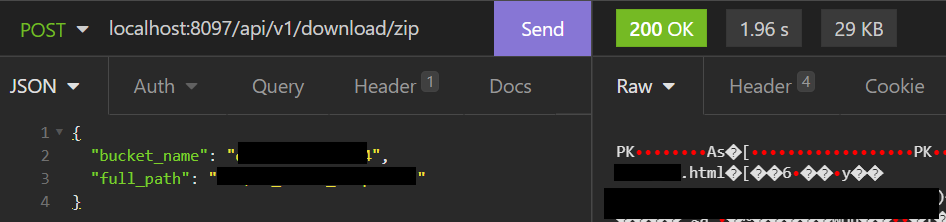
To run the code, you just need to handle the AWS login locally and run cargo run via your terminal or favorite IDE (I personally recommend RustRover).
For more details, please, check the README.md file.
Summary of Steps
- Set up a Rust project with
axum,aws-sdk-s3,zip, andtokio. - Configure the AWS Client to load credentials from the environment.
- Implement methods to
ListObjectsV2andGetObjectto read S3 content. - Implement safety checks (file size and file count limits).
- Expose an API endpoint receiving
Bucket NameandS3 Path. - Stream or write the files into a
.zipand return it to the client.
The Results
As the number of templates requiring updates grew, the time invested in manual changes—and the risk of human error—grew exponentially. With this PoC, combined with our bulk-edit shell script, we drastically reduced the turnaround time.
The process is now limited only by the few minutes it takes for the Amazon S3 Console to process the bulk upload. This is a classic example of how a few hours of coding can save days of future work, improve delivery quality and significantly reduce operational risk.
Do you need help modernizing your legacy applications, optimizing your architecture or improving your development workflows? Let’s connect on LinkedIn or check out my services on Upwork.
 Some Development Notes
Leave a comment